| Icon | Shortcut Key | Use |
|---|---|---|
 | Enter key | Enter/Continue |
 | Ctrl S | Save |
 | F3 | Back |
 | Shift F3 | Exit System Task |
 | F12 | Cancel |
 | Ctrl P | |
 | Ctrl F | Find |
 | Alt F12(PC only) | Customize local layout |
 | Ctrl G | Continue Search |
 | F1 | Help |
 | Ctrl Page Up | Scroll to top of document |
 | Page up | Scroll up one page |

Monday, February 13, 2017
ABAP Editor Keyboard Shortcuts

Thursday, February 9, 2017
Variable Naming Convention in ABAP
Here are some rules that I used for my convenience in coding ABAP. You can also have your own style in naming the variables in ABAP. These naming convention might help you remember and differentiate variables that you used, but keep in mind that you might need to follow a different naming convention in every project.
| Variable Type | Usage |
| Global Varibles | gv_<variablename> |
| d_<variablename> | |
| Local Variable | lv_<variablename> |
| ld_<variablename> | |
| Global Internal Table | it_<internaltablename> |
| gt_<internaltablename> | |
| Local Internal Table | lt_<internaltablename> |
| Global Work Area | gw_<workareaname> |
| Local Work Area | lw_<workareaname> |
| wa_<workareaname> | |
| Constant | c_<constantname> |
| Parameter | p_<parametername> |
| Select_option | s_<selectoptionname> |
| Ranges | r_<rangename> |
| Type Structure | ty_<structurename> |
| Subroutines | F_<subroutinename> |
| FORM_<subroutinename> |
Source:
Friday, February 3, 2017
SAP Basic Operators, Keywords, Functions
Arithmetic Operators
| Operator | Using Operator | Using Keyword |
| Less than | a < b | a LT B |
| Greater than | a > b | a GT b |
| Less than or equal | a <= b | a LE b |
| Greater than or equal | a >= b | a GE b |
| Equal | a = b | a EQ b |
| Not equal | a <> b | a NE b |
Comparison Operators
| Operator |
Using Operator
|
Using Keyword
|
Addition
|
p = n + m.
|
ADD n TO m.
|
Subtraction
|
P = m – n.
|
SUBTRACT n FROM m.
|
Multiplication
|
P = m * n.
|
MULTIPLY m BY n.
|
Division
|
P = m / n.
|
DIVIDE m BY n.
|
Integer division
|
P = m DIV n.
|
---
|
Remainder of division
|
P = m MOD n.
|
---
|
Powers
|
P = m ** n.
|
Logical Expressions
| Expression | Usage |
| AND | (a<b) and (a<c) |
| OR | (a<b) or (a<c) |
| NOT | a NOT b |
| BETWEEN | a BETWEEN b AND c |
| IS | a IS (NULL/ASSIGNED/BOUND/INITIAL) |
Numeric Data Types Functions
DATADATA n TYPE p DECIMALS 2.
DATA m TYPE p DECIMALS 2 VALUE '-5.55'.
| Function | Usage | Output | |||||
| ABS | n = abs( m ). WRITE: 'ABS: ', n. | ABS: 5.55 | |||||
| SIGN | n = sign( m ). WRITE: / 'SIGN: ', n. | SIGN: 1.00- | |||||
| CEIL | n = ceil( m ). WRITE: / 'CEIL: ', n. | CEIL: 5.00- | |||||
| FLOOR | n = floor( m ). WRITE: / 'FLOOR:', n. | FLOOR: 6.00- | |||||
| TRUNC | n = trunc( m ). WRITE: / 'TRUNC:', n. | TRUNC: 5.00- | |||||
| FRAC | n = frac( m ). WRITE: / 'FRAC: ', n. | FRAC: 0.55- | |||||
Floating-Point Functions
| Function | Meaning | ||||
| acos, asin, atan; cos, sin, tan | Trigonometric functions. | ||||
| cosh, sinh, tanh | Hyperbolic functions. | ||||
| exp | Exponential function with base e (e=2.7182818285). | ||||
| log | Natural logarithm with base e. | ||||
| log10 | Logarithm with base 10. | ||||
| sqrt | Square root. | ||||
String Logical Expression
| CO | str1 only contains characters from <str2>; |
| CN | str1 contains characters not only from str2 (corresponds to NOT str1 CO str2); |
| CA | str1 contains at least one character from str2; |
| NA | str1 does not contain any characters from str2; |
| CS | str1 contains the string str2; |
| NS | str1 does not contain the string str2; |
| CP | str1 contains the pattern str2; |
| NP | str1 does not contain the pattern str2; |
String Functions
DATA: title(15) TYPE c VALUE 'Mr',
surname(40) TYPE c VALUE 'Smith',
Forename(40) TYPE c VALUE 'Joe',
sep, "an empty character by default"
Destination(200) TYPE c,
spaced_name TYPE STRING VALUE 'Joe Smith',
len TYPE i.
Forename(40) TYPE c VALUE 'Joe',
sep, "an empty character by default"
Destination(200) TYPE c,
spaced_name TYPE STRING VALUE 'Joe Smith',
len TYPE i.
| Function | Usage | Output |
| CONCATENATE | DATA: title(15) TYPE c VALUE 'Mr', | |
| surname(40) TYPE c VALUE 'Smith', | ||
| forename(40) TYPE c VALUE 'Joe', | ||
| sep, "an empty character by default" | ||
| destination(200) TYPE c. | ||
| CONCATENATE title surname forename INTO destination SEPARATED BY sep. | Mr Smith Joe | |
| CONDENSE | DATA spaced_name TYPE string VALUE 'Joe Smith'. | |
| CONDENSE spaced_name. | Joe Smith | |
| CONDENSE NO GAPS | CONDENSE spaced_name NO-GAPS. | JoeSmith |
| STRLEN | DATA len TYPE i. | |
| len = strlen( surname ). | ||
| WRITE / len. | ||
| strlen( surname ). | 5 | |
| REPLACE | REPLACE ' ' WITH '-' INTO destination. | Mr-Smith Joe |
| REPLACE ' ' WITH '-' INTO destination. | Mr-Smith-Joe | |
| REPLACE ALL OCCURRENCES | REPLACE ALL OCCURRENCES OF '-' IN destination WITH '+'. | Mr+Smith+Joe |
| SEARCH | destination = 'Mr. Smith Joe'. | |
| SEARCH destination for 'Joe '. | sy-fdpos 10 | |
| SEARCH destination for '*ith'. | sy-fdpos 4 | |
| SEARCH destination for 'John'. | sy-subrc 4 | |
| SHIFT | DATA empl_num TYPE STRING VALUE '0000654321'. | |
| SHIFT empl_num. "become 000654321 | 000654321 | |
| SHIFT DELETE LEADING | empl_num = '0000654321'. | |
| SHIFT empl_num left deleting leading '0'. "become 654321 | 654321 | |
| SHIFT CURCULAR | empl_num = '0000654321'. | |
| SHIFT empl_num CIRCULAR. | 0006543210 | |
| SPLIT | DATA mystring TYPE string VALUE '1234** ACBD **6789'. | |
| DATA: a(10) TYPE c, | ||
| b(10) TYPE c, | ||
| c(10) TYPE C, | a 1234 | |
| sep2(2) TYPE c VALUE '**'. | b ABCD | |
| SPLIT mystring AT sep2 INTO a b c. | c 6789 | |
| SUBFIELDS | DATA: int_tel_num(17) TYPE c VALUE '+62-812345678', | |
| country_code(3) TYPE c, | ||
| tel_num(14) TYPE c. | ||
| country_code = int_tel_num(3). | 62 | |
| tel_num = int_tel_num+4(13). | 812345678 |
Formatting String Functions
| Function | Description |
| LEFT-JUSTIFIED | Specifies that the output is left-justified. |
| CENTERED | Denotes that the output is centered. |
| RIGHT-JUSTIFIED | Specifies that the output is right-justified. |
| UNDER <g> | The output starts directly under the field <g>. |
| NO-GAP | Specifies that the blank after field <f> is rejected. |
| USING EDIT MASK <m> | Denotes the specification of the format template <m>. Using No EDIT Mask: This specifies that the format template specified in the ABAP Dictionary is deactivated. |
| NO-ZERO | If a field contains only zeroes, then they are replaced by blanks. |
Formatting Numeric Functions
| Function | Description |
| NO-SIGN | Specifies that no leading sign is displayed on the screen. |
| EXPONENT <e> | Specifies that in type F (the floating point fields), the exponent is defined in <e>. |
| ROUND <r> | The type P fields (packed numeric data types) are first multiplied by 10**(-r) and then rounded off to an integer value. |
| CURRENCY <c> | Denotes that the formatting is done according to the currency <c> value that is stored in the TCURX database table. |
| UNIT <u> | Specifies that the number of decimal places is fixed according to the <u> unit as specified in the T006 database table for type P. |
| DECIMALS <d> | Specifies that the number of digits <d> must be displayed after the decimal point. |
Thursday, February 2, 2017
The Central Repository of SAP, DATA DICTIONARY
ABAP Dictionary is a
major tool of ABAP workbench which acts as a central repository for data
definitions in SAP System. Hence, any new of modified information will be
automatically provided for all system components to ensure the integrity,
consistency, and security of the data. Having said that, it is just an
interface as there is a real database which stores the data like DB2, MS SQL,
Oracle, and even HANA.
The Object types in
ABAP Dictionary are:
Tables: This is a
table just like the one in a typical Relational Database Management System
View: This is a
logical view of more than one table like the a Relational Database View do
Data Types: These
are basic global data types, but very important as they determine the types of
the data used by lots of programs. The data types includes:
Structure: Structure is a sequence of any other data types that can be used in the making of a workarea or even an internal table.
Table types: Just like a structure, but it is only for an internal table.
To summarize this,
you can thinking the data types in this way:
Domain --> Data
Elements --> Structure --> Table Type --> Table --> View

Tuesday, January 31, 2017
Simple Write Report in SAP
Preparation
Although I have posted my very first Hello World post, I haven't demonstrate any tutorial yet. Therefore, i will guide you to create your very first report Program at SAP with ABAP. First of all, you will need: - SAP GUI on your computer - Authenticated SAP account to access an SAP Server If you do not have an access to SAP, I am afraid you have to create your very own SAP Server known as SAP IDES (Internet Demonstration and Evaluation System) for the purpose of training and learning by following one of two tutorials here:Where to Start?
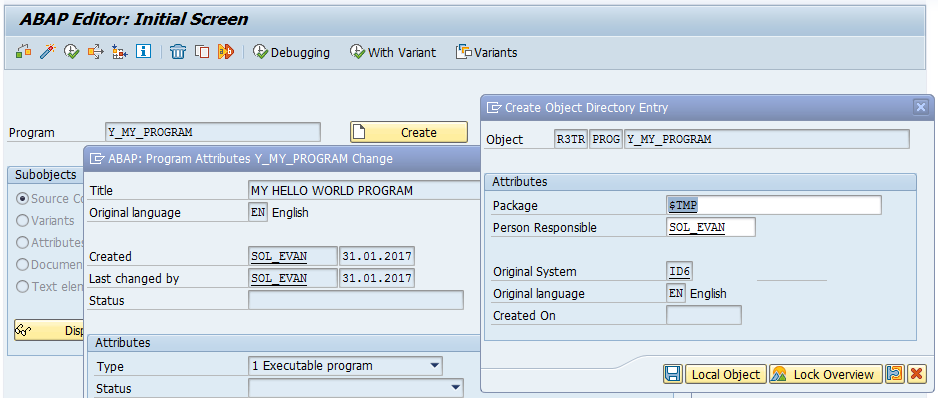
Once you managed to logged on SAP System, you can start go to ABAP Editor with t-code SE38 in the command field at the top left of the SAP screen.
Type your program name starting with letter Y or Z (OBLIGATORY) like Y_MY_PROGRAM, then press Create Button and type the Program title and choose Executable Program as the type. After that save and choose $TMP (Local Object) as the package unless you need to transport this program.
PRINT, I mean WRITE
Once you are in ABAP Editor, you can start create your very first program in the next ABAP Editor Window, simply write these two lines of codes:

REPORT  y_my_program.
WRITE 'Hello World!'.
Once you are done, Press Direct Processing Button (F8)
 And voila, your Hello World! Report Program in SAP :D On any other language, you
might end your programming statement with semicolon (;), in ABAP, you use dot
(.) just like a sentence. You can write more words or variable in the write
sentence using semicolon (:), it is used to input multiple data in many ABAP
syntax like write.
And voila, your Hello World! Report Program in SAP :D On any other language, you
might end your programming statement with semicolon (;), in ABAP, you use dot
(.) just like a sentence. You can write more words or variable in the write
sentence using semicolon (:), it is used to input multiple data in many ABAP
syntax like write.Example:
WRITE: 'This', 'is' , 'my', 'first', 'program'.This is the same like writing the following statements
WRITE 'This'.
WRITE 'is'.
WRITE 'my'.
WRITE 'first'.
WRITE 'program'.
Next Line Please
These statement will give the same exact result like this, continuing the previous Hello World, it seems that it gives a space to every word

To enter a new line you can use slash (/) in the write syntax.
WRITE / 'This is my second line'.
However, using slash seems too redundant to have some line spacing, hence you can use
SKIP [number of lines] to skip some lines.
SKIP 2.
Stick Your Notes
Another important thing to know is commenting in your ABAP code, you can use asterisk (*) to give a full commend in a line and double quote (") to give partial commend at the end of a statement. Last tips to do a block commenting, you can make the use of ctrl + (<) to comment and ctrl + (>) to uncomment.*Write any bullshit in the line when there is an asterisk in the front WRITE 'End of my Hello World Report'. "This is the end
Compilation
To give the whole idea of this tutorial, please mind to look and try yourself compiled code below.Source Code:
REPORT  y_my_program.

WRITE 'Hello World!'.

WRITE: 'This', 'is' , 'my', 'first', 'program'.

*Next line
WRITE / 'This is my second line'.

*Another method to make new line
SKIP 2.

*Write any bullshit in the line when there is an asterisk in the front
WRITE 'End of my Hello World Report'. "This is the end

*    _    ____    _    ____
*   / \  | __ )  / \  |  _ \  Block Comment
*  / _ \ |  _ \ / _ \ | |_) | Use CTRL + <
* / ___ \| |_) / ___ \|  __/  will automatically put asterisk
*/_/   \_\____/_/   \_\_|     in the front of the block
Result:

Hello World!
Hello World! This is the first post i just published on the day i made this blog on 31th January 2017. I believe most of the readers here have been familiar with my "Hello World!" phrase which is used in your very first program with a particular new language and here I will share my knowledge in ABAP language in this blog for everyone to learn.
If you haven't heard of ABAP, it is stands for Advanced Business Application Programming, originally Allgemeiner Berichts-Aufbereitungs-Prozessor in German, a high-level programming language created by the German software company, SAP SE. Hence, it can only be used in its ERP Software's environment, SAP for customisations of feature implementation in it.
By the way, my name is Evan Christiawan, I am a graduate student from Murdoch University majoring in Computer Science and Cyber Forensics. Currently, I work as ABAP technical consultant at Soltius Indonesia, a subsidiary of Metrodata Group that focuses its business in dealing with SAP Solution to help companies run better.
I think that's all for the introduction and won't introduce more about me unless you want to know me more :). Hopefully i can keep updating posts/notes in this blog and help lots of people who are curious in learning ABAP, a language of SAP.
If you haven't heard of ABAP, it is stands for Advanced Business Application Programming, originally Allgemeiner Berichts-Aufbereitungs-Prozessor in German, a high-level programming language created by the German software company, SAP SE. Hence, it can only be used in its ERP Software's environment, SAP for customisations of feature implementation in it.
By the way, my name is Evan Christiawan, I am a graduate student from Murdoch University majoring in Computer Science and Cyber Forensics. Currently, I work as ABAP technical consultant at Soltius Indonesia, a subsidiary of Metrodata Group that focuses its business in dealing with SAP Solution to help companies run better.
I think that's all for the introduction and won't introduce more about me unless you want to know me more :). Hopefully i can keep updating posts/notes in this blog and help lots of people who are curious in learning ABAP, a language of SAP.
Subscribe to:
Posts (Atom)