In the previous post I have share exporting or downloading SAP ABAP Internal Table to XML File, but how about the vice versa? Hence, i will explain it as well in 3 similar simple stages:
- Prepare your XML File
For this example, i will use the following XML
-
Create Transformation:
<?xml version="1.0" encoding="utf-8"?>
<ROOT>
<purchase_doc>
<purchase_no>6000000025</purchase_no>
<item_no>00010</item_no>
<changed_on>2015-02-05</changed_on'>
<material_no>100-100</material_no>
<stor_loc/>
</purchase_doc>
<purchase_doc>
<purchase_no>6000000026</purchase_no>
<item_no>00010</item_no>
<changed_on>2015-02-05</changed_on>
<material_no>100-100</material_no>
<stor_loc/>
</purchase_doc>
</ROOT>
- Go to tcode STRANS or XLST_TOOL
- Create an X XSLT Program Transformation
- Copy and Modify the following source code as template
-
<xsl:transform xmlns:xsl="http://www.w3.org/1999/XSL/Transform" xmlns:sap="http://www.sap.com/sapxsl" version="1.0">
<xsl:output encoding="UTF-8" indent="no" method="xml" version="1.0"/>
<xsl:strip-space elements="*"/>
<!-- custom -->
<xsl:template match="/">
<asx:abap xmlns:asx="http://www.sap.com/abapxml" version="1.0">
<asx:values>
<IEKPO>
<xsl:apply-templates select="//<purchase_doc>"/>
</IEKPO>
</asx:values>
</asx:abap>
</xsl:template>
<xsl:template match="<purchase_doc>">
<item>
<EBELN>
<xsl:value-of select="<purchase_no>"/>
</EBELN>
<EBELP>
<xsl:value-of select="<item_on>"/>
</EBELP>
<AEDAT>
<xsl:value-of select="<changed_on>"/>
</AEDAT>
<MATNR>
<xsl:value-of select="<material_no>"/>
</MATNR>
<LGORT>
<xsl:value-of select="<stor_loc>"/>
</LGORT>
</item>
</xsl:template>
<!--End Custom-->
</xsl:transform>
- Complete your Program
- Create a Data Type/Structure/Table Type based on your XML File data
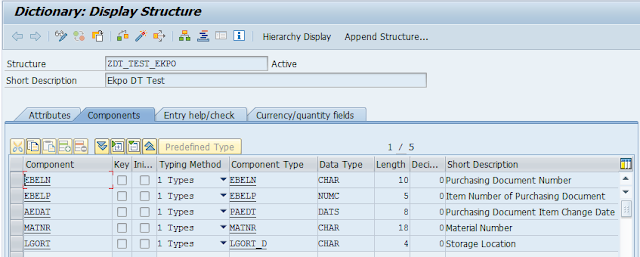
- Create the internal table in your ABAP Report
DATA: it_out TYPE STANDARD TABLE OF <YOUR_DATA_TYPE>.
      wa_out TYPE <YOUR_DATA_TYPE>.
- Insert, modify and perform the following FORM.
form F_XML_IMPORT .
* Table for the XML content
DATA: it_xml       TYPE STANDARD TABLE OF char2048.


DATA: it_result_xml TYPE abap_trans_resbind_tab,
      wa_result_xml TYPE abap_trans_resbind.

DATA: gs_rif_ex     TYPE REF TO cx_root,
      gs_var_text   TYPE string.

* Set XML File Location
DATA p_file_name type string.
p_file_name = "Your_XML_File_Location".

* Get the XML file
CALL METHOD cl_gui_frontend_services=>gui_upload
  EXPORTING
    filename                = p_file_name
  CHANGING
    data_tab                = it_xml
  EXCEPTIONS
    file_open_error         = 1
    file_read_error         = 2
    no_batch                = 3
    gui_refuse_filetransfer = 4
    invalid_type            = 5
    no_authority            = 6
    unknown_error           = 7
    bad_data_format         = 8
    header_not_allowed      = 9
    separator_not_allowed   = 10
    header_too_long         = 11
    unknown_dp_error        = 12
    access_denied           = 13
    dp_out_of_memory        = 14
    disk_full               = 15
    dp_timeout              = 16
    not_supported_by_gui    = 17
    error_no_gui            = 18
    OTHERS                  = 19.

IF sy-subrc <> 0.
  MESSAGE ID sy-msgid TYPE sy-msgty NUMBER sy-msgno
          WITH sy-msgv1 sy-msgv2 sy-msgv3 sy-msgv4.
ENDIF.

* Fill the result table with a reference to the data table.
* Within the XSLT stylesheet, the data table can be accessed with
* "IPERSON".

GET REFERENCE OF it_out INTO wa_result_xml-value.
wa_result_xml-name = 'IEKPO'.
APPEND wa_result_xml TO it_result_xml.

* Perform the XSLT stylesheet
TRY.
    CALL TRANSFORMATION <YOUR_TRANSFORMATION_NAME>
    SOURCE XML it_xml
    RESULT (it_result_xml).

  CATCH cx_root INTO gs_rif_ex.

    gs_var_text = gs_rif_ex->get_text( ).
    MESSAGE gs_var_text TYPE 'E'.

ENDTRY.
endform.                    " F_XML_IMPORT